Every year, the Friday after Thanksgiving turns the inbox into a wall of percentages. 30% off. 40% off. Everything must go. And every year, the brands that do well with Black Friday email marketing are rarely the ones shouting the biggest number.
Last year’s data says as much. Klaviyo’s 2025 BFCM recap found that discounts fell about 10% year over year, and revenue went up anyway. Repeat buyers did most of the lifting. Shoppers didn’t need a deeper cut. They needed a reason to open, and a reason to come back.
So what follows is a schedule rather than a list of subject lines. Black Friday stopped being a single day a while ago, and the emails that work treat it as a five-week stretch with a different job for each week. I’ll walk through each stage, what to send, and where content that updates at open (timers, polls, scratch cards, live prices) actually earns its place.
Black Friday email marketing in 2026 runs for a week, not a day
The dates first. Thanksgiving falls on Thursday, November 26, Black Friday on the 27th, and Cyber Monday on November 30. In practice, your sale starts whenever your competitors’ does, and that keeps creeping earlier.
Adobe’s numbers show the shift. In 2025, US shoppers spent $44.2 billion online across Cyber Week, the five days from Thanksgiving to Cyber Monday. Black Friday alone hit a record $11.8 billion, up 9.1%. Cyber Monday was still the biggest day at $14.25 billion, but it’s now the second year running that Black Friday grew faster, which Adobe puts down to deals launching earlier.
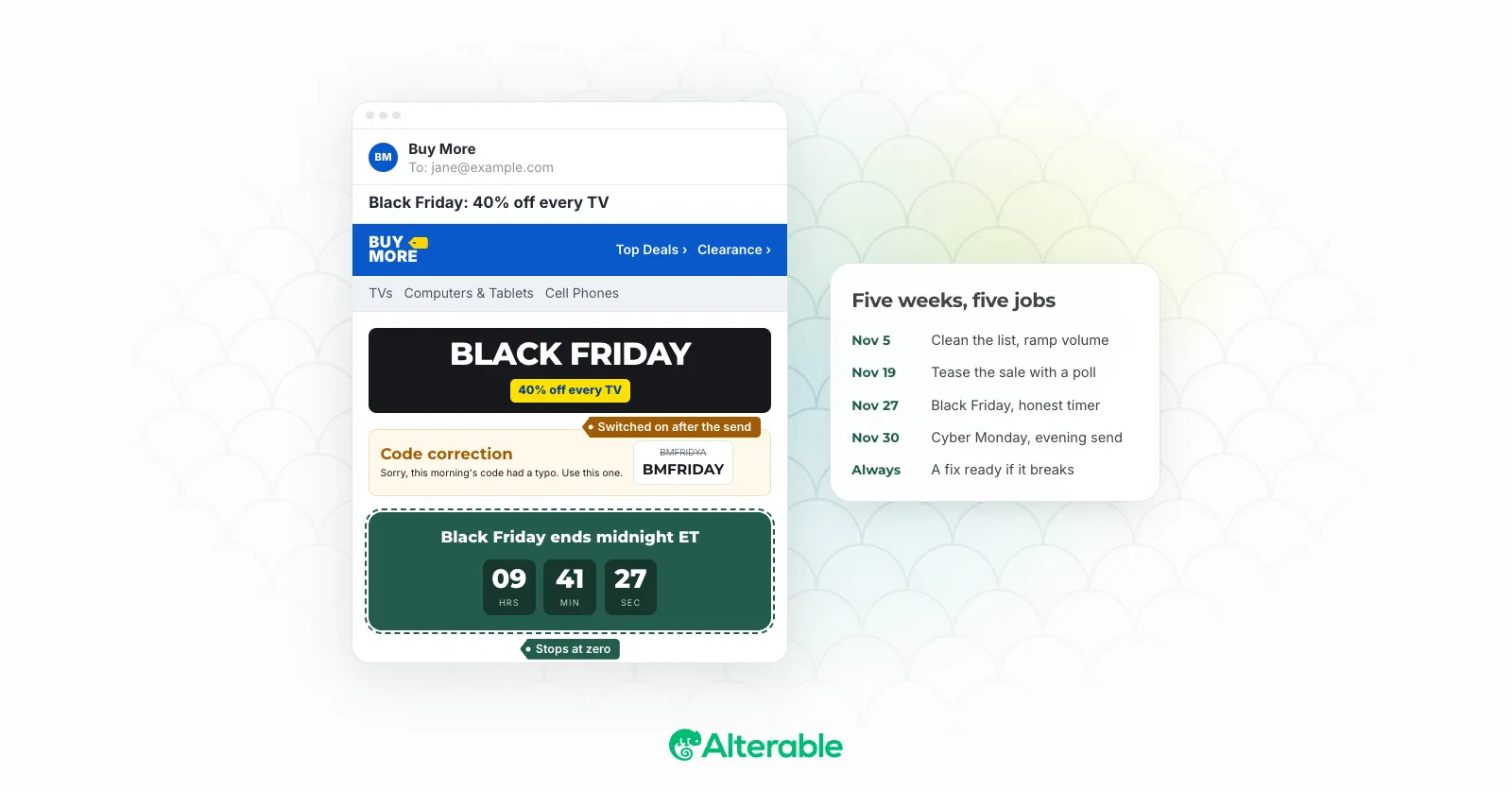
Which means your Black Friday email campaign can’t be one big send on Friday morning. It’s closer to a short series with a beginning, a peak and an end:
- Three weeks out: list cleanup, authentication, a gradual volume ramp.
- The week before: teasers, early access, and a reason to click before the sale opens.
- Thanksgiving to Sunday: the sale itself, with deadlines people can trust.
- Cyber Monday: the last push, timed for when people actually shop.
- Always on: a way to fix an email after it has gone out.
Three weeks out: fix the plumbing before you need it
Nobody gets excited about this part. It’s also where I’ve seen the most Black Friday campaigns quietly fail, because a brilliant email that lands in spam is still an email nobody reads.
The inbox is crowded that week. Klaviyo alone delivered more than 22.7 billion messages over BFCM 2025, up 25% on the year before. Mailbox providers respond to that flood by getting pickier, so the senders with clean lists and solid reputations get through and everyone else fights for the Promotions tab.
A few things to sort out now, while there’s still time:
- Clean the list. Suppress addresses that haven’t opened or clicked in six months or more, and validate anything you collected recently. Our guide to email list cleaning covers how far to go.
- Check your authentication. Gmail and Yahoo expect bulk senders to have SPF, DKIM and DMARC in place, plus one-click unsubscribe. Run a deliverability check on a real campaign, not just your DNS.
- Ramp, don’t spike. If you plan to send three times your usual volume on Black Friday, start increasing frequency now. A sudden jump looks a lot like a compromised account to a spam filter. The same logic as domain warm-up applies.
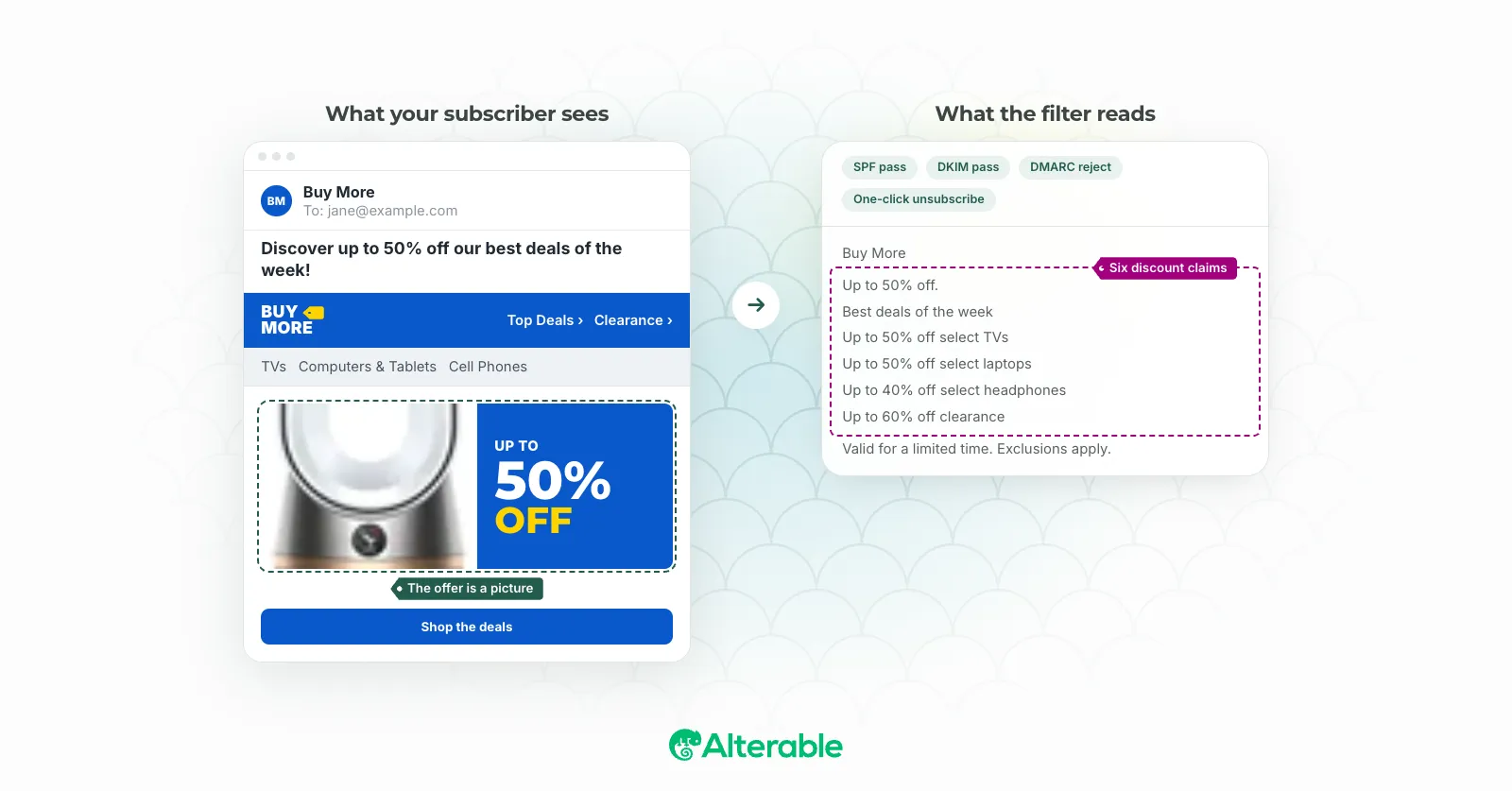
- Read it like a filter would. Authentication isn’t the whole story. We broke down a campaign that passed every check and still read like spam, and the lessons apply double during Cyber Week.
One more thing to do this week, which I’ll come back to later: put an emergency banner in every Black Friday template now, switched off, so you have a way to correct an email after it’s sent.
The week before: tease the sale and let subscribers vote
The Black Friday teaser email has one job: get people to open the sale email when it arrives. Most teasers I see waste it on “Something big is coming,” which tells the reader nothing and gives them no reason to remember you on Friday.
Ask them something instead. A one-click poll in the teaser (“Which category should we discount deepest?”) does two things at once. It gets a click in a week when clicks are hard to come by, and it tells you what each person cares about before the sale starts.
That second part is where it gets useful. With Alterable polls, each answer can link to its own page, so your ESP can segment people by what they picked. The person who voted “outerwear” gets an outerwear hero on Friday. Same campaign, a more relevant email, and you didn’t have to guess.
A few practical notes:
- Keep it to two to four answers. It’s a teaser, not a survey.
- Show the live split. Each answer image is drawn with the current results at open, which gives people a small reason to open the email again later. (Apple Mail readers may see the results as they were at delivery, because of Mail Privacy Protection.)
- Reward your regulars first. Klaviyo found repeat-buyer revenue grew 13.5% over BFCM 2025, faster than new buyers. An early-access email to past customers, a day before everyone else, costs you almost nothing, and it goes to the people most likely to buy.
Black Friday itself: a countdown timer that tells the truth
A Black Friday countdown timer is the most predictable tactic on this list, and it still works. Urgency is real. The problem is that a lot of timers lie.
Carter’s is already running this play, more than a month early. On Saturday, October 17, it sent a “PREVIEW: Up to 60% off Black Friday” email. Two days later it followed with “FINAL COUNTDOWN” at 8:24 a.m. and “ENDS SOON: Up to 60% off (Early) Black Friday” at 12:08 p.m., the deadline doing the work in both subject lines. Read the text version of that last one and, near the top, it says “Display images to show real-time content.” It’s a small touch, but it tells anyone with images off that there’s something live they’re missing.
carter's: ENDS SOON: Up to 60% off (Early) Black Friday on Inbox Archive
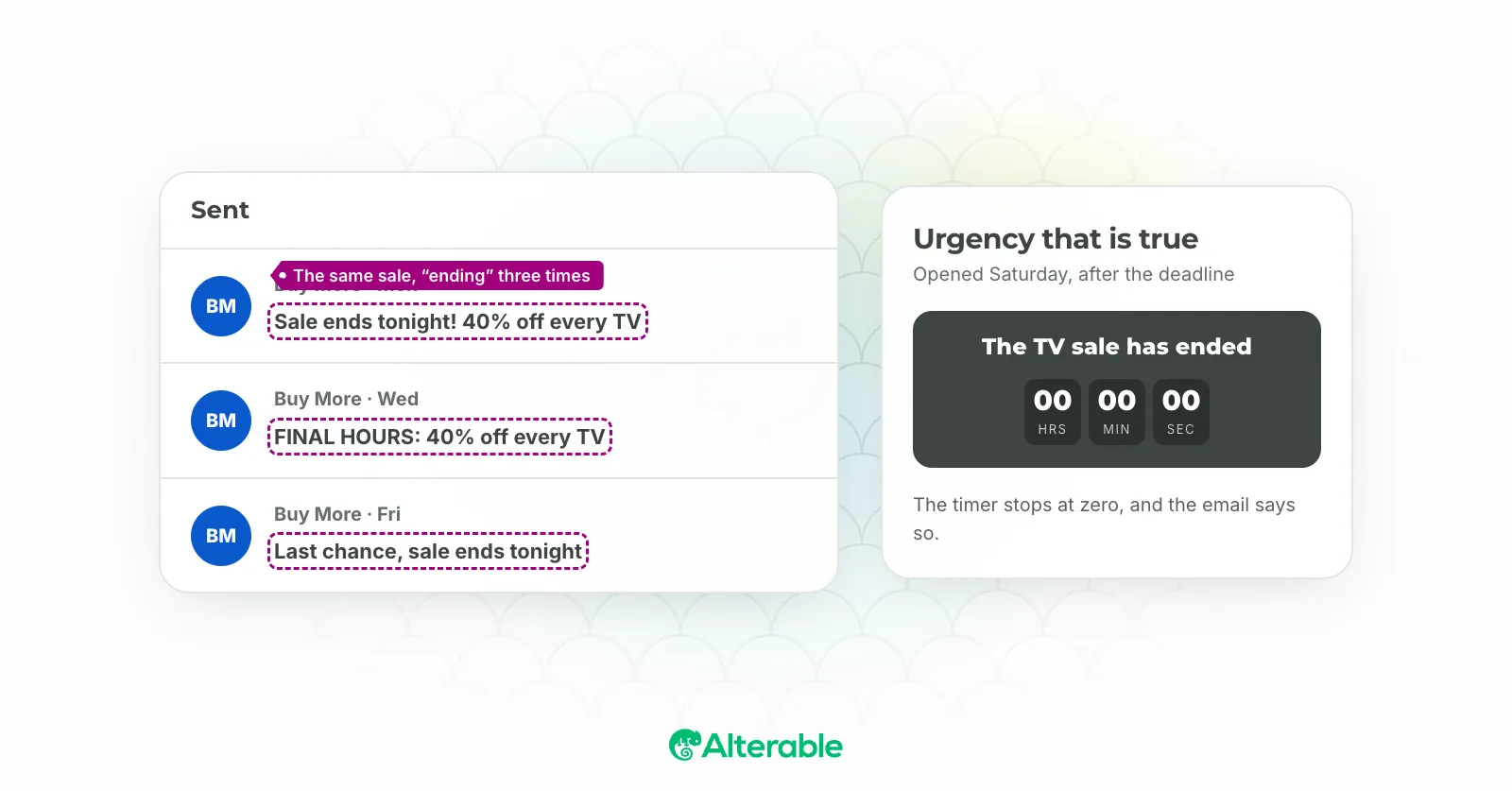
Think about the email you send Friday morning. Plenty of people open it on Saturday, some on Tuesday. If the timer was baked into a static GIF, or counts past zero into nonsense, it’s now advertising a deal that’s over. That’s annoying for the reader and, in some places, legally risky: Washington’s CEMA rulings mean a false urgency email can now carry per-message penalties.
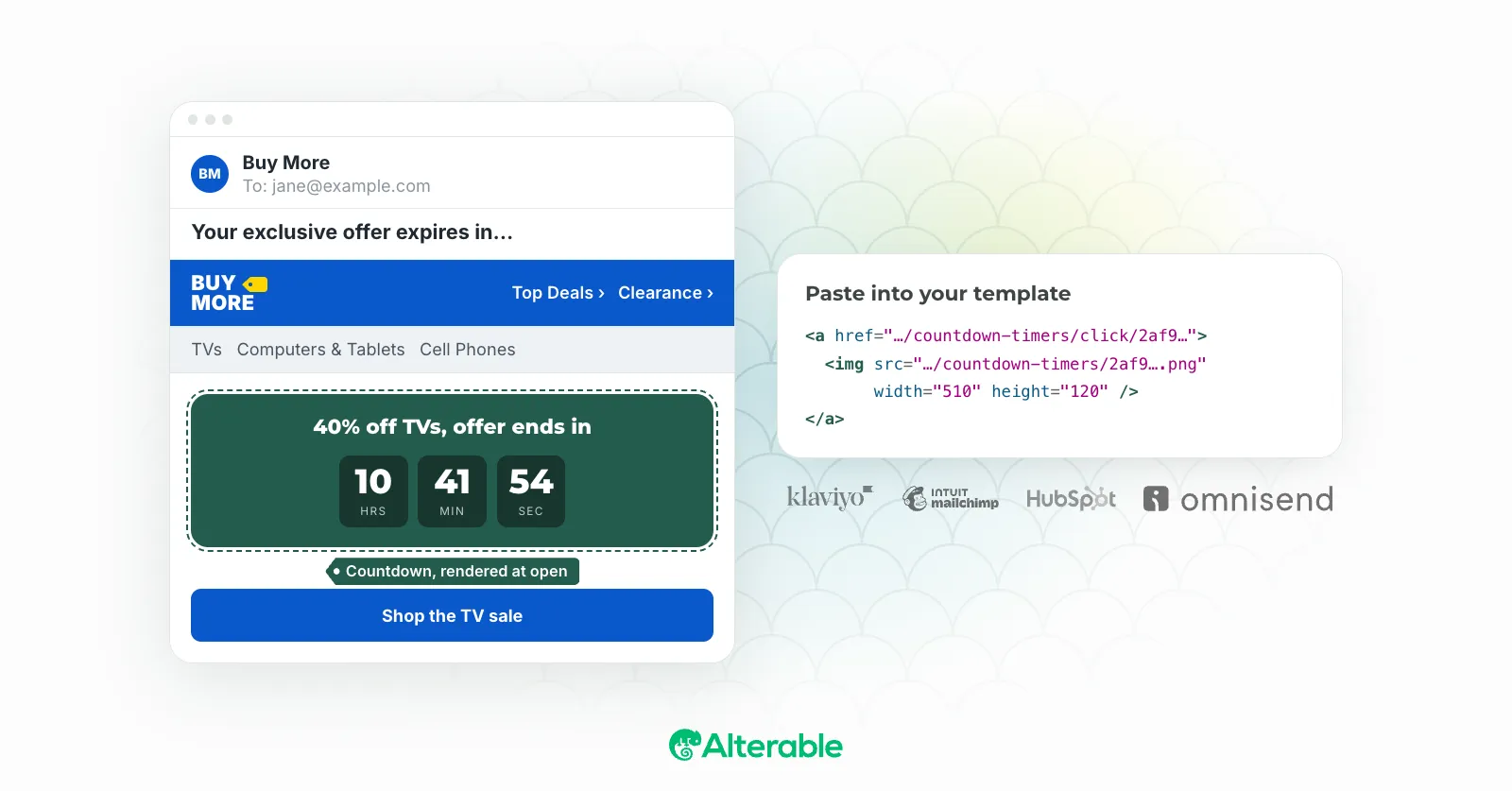
A timer that’s drawn at open avoids most of this. Here’s what I’d set up:
- A fixed deadline in one timezone. Pick the zone your sale actually ends in and say so in the copy (“ends midnight ET”). Everyone counts down to the same moment.
- An expiry image. When the clock hits zero, swap the timer for something true: “This sale has ended. Here’s what’s still on.” Alterable countdown timers stop at 00:00 and can show your own expiry message or image after.
- A plan for extensions. If you extend the sale to Saturday, change the deadline once. Because the timer is drawn at each open, emails already sitting in inboxes show the new end time from the next open.
- A check in classic Outlook. The Windows desktop version shows only the first frame of an animated image, so the time is correct at open but won’t tick. Make sure that first frame reads well on its own. Our timer compatibility guide covers the rest.
If you’re new to all this, start with how to add a countdown timer to your email, and look at the difference between evergreen and fixed-date timers before you build your welcome flow for all the new subscribers Black Friday brings in.
The weekend: give people something other than a bigger percentage
By Saturday, your subscribers have seen your offer at least twice. Sending it a third time with a slightly louder subject line is what most brands do. But what is a third send going to tell them that the first two didn’t?
This is where I’d change the format rather than the discount.
Make the offer something they uncover
A scratch card turns the same coupon into something that feels won. With Alterable Scratchers, the email carries the card’s cover, and the scratching happens on a page Alterable hosts, one tap from the inbox (email clients don’t run script, so there’s no way around that step).
The interesting part for Black Friday is the prize pool. On the Pro plan you can weight prizes against each other, so a 50% off code shows up rarely while everyone else still gets 10% off or free shipping. Your average discount can actually go down, which fits what Klaviyo saw last year: shoppers kept buying even as discounts shrank. Add your ESP’s subscriber-ID merge tag to the link and each person gets one draw, fixed to them, no matter how many times they reopen it.
Stop advertising things you’ve already sold
Nothing burns goodwill faster on a Black Friday weekend than a Saturday email featuring the doorbuster that sold out Friday at 9 a.m.
Dynamic products fix that by reading price and stock at open, from what you keep in Alterable. Turn on “hide sold-out items” and a product drops out of the block when its count hits zero, replaced by the next pick. The block’s default product always shows, so nobody opens an empty row. And if you cut a price on Sunday afternoon, emails sent on Friday show it from the next open.
Cyber Monday: send for the evening, not the morning
Cyber Monday is still the biggest online shopping day of the year, and its peak comes late. Adobe tracked spending at $16 million a minute between 8 and 10 p.m. on Cyber Monday 2025.
That doesn’t mean you should hold every Cyber Monday email until 7 p.m. It means your morning send shouldn’t be your last one. A short last-chance email in the late afternoon, with the timer counting down to midnight, catches the people who browsed at lunch and planned to buy after dinner.
Two things matter more on Monday than on any other day of the week:
- Design for the phone. Mobile accounted for 57.5% of Cyber Monday online sales last year, per the same Adobe data. Your timer and your offer need to read at half the width you designed them at.
- Keep the last email short. By Monday night, nobody needs your brand story. The offer, the deadline, one button. The spam trigger words guide is worth a glance here too, since “last chance” subject lines tend to drift into all-caps territory.
When something breaks at 6 a.m. on Black Friday
Something usually does. A typo in the coupon code. A checkout that falls over under load. A carrier that announces delays the morning after your “arrives before Christmas” email went out. Even Shopify had a rough Cyber Monday in 2025, and merchants still set records.
The usual fix is a correction email, which means another send to a list you’ve already hit hard, with a subject line that starts with “Oops.” It works, but it costs you attention you’d rather spend on the sale.
There’s a quieter option if you planned for it. Once an email lands, its words are fixed, but its images still load at open. A critical message is an image you place at the top of the template before you send, switched off. Off, it’s a transparent 1×1 pixel: no space, nothing visible. If something goes wrong, you switch it on, and every email opened from then on shows the banner, with the wrong code struck through above the right one, or the old delivery date next to the new one.
Two caveats, because they matter. Apple Mail can hold on to the version it already loaded, so someone who opened before you flipped the switch may not see it for a day or two. For anything every customer must know, send the follow-up as well. And building a critical message is free, but switching one on takes Alterable Pro, so set it up now and upgrade on the day you need it, if you ever do.
If you only have time for two things
Five weeks of planning is a lot to ask in late October. So here’s the short version of this Black Friday email marketing playbook.
Put a countdown timer that stops at zero in your Black Friday send, so nobody opens a dead deal on Tuesday. And put a switched-off critical message at the top of every template, so a typo at 6 a.m. doesn’t turn into an apology email at 7. Neither one is clever. Both are the kind of thing you’re very glad you did on the Saturday.
You can build both on Alterable’s free plan in a few minutes, and the setup guides show where the image tag goes in Klaviyo, Mailchimp, HubSpot and ten other ESPs. Voilà. The rest of the playbook can wait until next year, if it has to.