
Prices that keep up with the store
- 1
Shopify · Trigger
Product updated - 2
Alterable · Action
Update Product
Every product image in every sent email shows the new price and stock on next open. The campaign you sent Tuesday is correct on Friday.


Private beta
Alterable images render the moment an email is opened. So when a Zap updates a price, a deadline or a stock count, the emails you already sent change too, on their next open. No resend. That one property turns Zapier from a send-time tool into an after-send one.
Private beta · On every paid plan, from Starter
1. Trigger · Shopify
Product updated
2. Action · Alterable
Update Product · price, stock
Email sent TuesdayOpened Friday
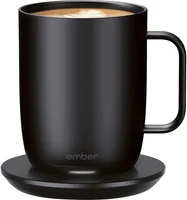
Smart Mug 2
$89$69
Only 4 left
Illustration. The email went out Tuesday; the price changed on its next open, with no resend.
7,000+ apps
on the other end of every Zap
14 steps
2 triggers, 8 actions and 4 searches
0 resends
sent emails update on their next open
Most email integrations stop mattering the moment a campaign goes out. Whatever was true at send-time is frozen into everyone’s inbox, and if the price drops or the deadline moves, your options are a correction email or silence.
Alterable renders its images at open-time, which means the content of a sent email is still yours to change. Connect that to Zapier and every one of those 7,000+ apps can do the changing: your store updates a price, your calendar extends a deadline, your spreadsheet rewrites a headline, and the emails already sitting in inboxes follow along.
Triggers fire when recipients do something in your emails. Actions let other apps change what Alterable renders. Searches pull data out on demand.
Fires when a recipient votes on a survey embedded in an email. You get the vote value, the recipient identifier and a timestamp, ready to route to a spreadsheet, a CRM or an alert.
Fires when a prize is drawn for a recipient’s scratch & win card, with the prize name and whether they revealed it. The natural start of a prize-fulfilment Zap.
Pull the current tally on a schedule: a Monday-morning digest to Slack, a weekly results email, a dashboard row.
Fetch the embed snippet for any countdown timer, dynamic image, dynamic product, local map, scratcher, survey or critical message, so any Zap can hand it to the tool that needs it.
Look one up by SKU or name before updating it. Zapier also offers each as Find or Create, so a Zap never fails on a record that doesn’t exist yet.
Spin up a timer per webinar, sale or event from any trigger. Returns the email-ready embed code, so the next step in the Zap can drop it straight into a campaign.
Extend a deal and every email you already sent shows the new deadline the next time it’s opened. No apology send, no correction campaign.
Pipe live data into image text: stock counts, leaderboard scores, headlines. Whatever writes the value, the image says it at open-time.
Sync your store catalogue so product images always show the live price, was-price and stock level, even in emails that went out last week.
Let a status page, an order system or an incident tool flip the banner you placed before the send. Emails opened from then on show it, and your team is notified either way.
Sync stores, stockists or events onto a local map from a spreadsheet, a POS or wherever the list lives.
Shopify · Trigger
Product updated
Alterable · Action
Update Product
Every product image in every sent email shows the new price and stock on next open. The campaign you sent Tuesday is correct on Friday.
Alterable · Trigger
New Scratcher Play · prize "20% off"
Your store · Action
Create discount code
Your ESP · Action
Send code to the winner
A recipient opens their scratch card, and a working discount code follows within minutes. No coupon list to pre-generate.
Your webinar tool · Trigger
New webinar scheduled
Alterable · Action
Create Countdown Timer
Your ESP · Action
Create the reminder campaign with the embed code
Schedule the session and the reminder emails get a live countdown to it, without anyone opening the Alterable dashboard.
The integration is part of every paid plan, from Starter. Not on one yet? Start free, upgrade from your account when you’re ready, then ask for the invite. While it’s in beta, access is enabled account by account.
Email support@alterable.com and tell us what you want to automate. A sentence is enough.
The team enables the integration on your account and sends you what you need to connect it to your Zapier workspace.
From there it’s ordinary Zapier: point-and-click triggers and actions, 7,000+ other apps, no code to write.
Button not opening your mail app? Write to support@alterable.com.
Yes. It’s built and running; access is invite-only while it’s in private beta. Email support@alterable.com and we’ll enable it on your account.
The integration uses the Alterable REST API, which is included on every paid plan, from Starter at $19 a month. See pricing for what each plan covers.
No, and that’s the point. Alterable images render at the moment an email is opened, so when a Zap updates a timer, a product or a merge tag, every email that already went out shows the new content on its next open. Nothing is resent, and nothing goes stale in the inbox.
Two things recipients do inside your emails: voting on an embedded survey (New Survey Vote) and playing a scratch & win card (New Scratcher Play). Both are polling triggers: Zapier checks for new votes and plays every 1 to 15 minutes, depending on your Zapier plan.
No. Zaps are built point-and-click in Zapier, from the triggers and actions listed above. The REST API and the MCP server are there underneath if you ever want to go deeper.
Alterable content is embedded as a plain image tag, so it works in any ESP. On the Zapier side, your ESP is just another app in the Zap: most recipes pair an Alterable step with a store, a webinar tool or an ESP step.
A connection uses one Alterable API token. Its reads span every team you belong to; its writes land in your current team.
Still have questions? Contact us →
Private beta
Tell us what you want to automate and we’ll enable the integration on your account. From there it’s ordinary Zapier: point-and-click, no code.
Private beta · On every paid plan, from Starter