A few years ago I opened a flash-sale email from a retailer I like, two days after they sent it. The hero image still said “48 hours left.” The product they were pushing had sold out the previous morning. Nothing in that email was wrong when it left their ESP. It was wrong by the time I read it, and there was no way for them to know.
That gap, between the moment an email is sent and the moment it’s actually read, is the problem dynamic email content exists to solve. Or at least, part of it. The other part is the older problem of sending the same message to fifty thousand people who have nothing in common except an email address.
Most guides on this topic blur those two problems together. I think it’s worth pulling them apart, because the techniques are different, the tooling is different, and the mistakes you can make are different.
Two things people mean by “dynamic email content”
Dynamic email content is any part of an email that isn’t fixed at design time. It changes based on who’s reading, or when they’re reading, or both. That’s the broad definition, and it’s correct as far as it goes. In practice, though, there are two distinct mechanisms hiding inside it.
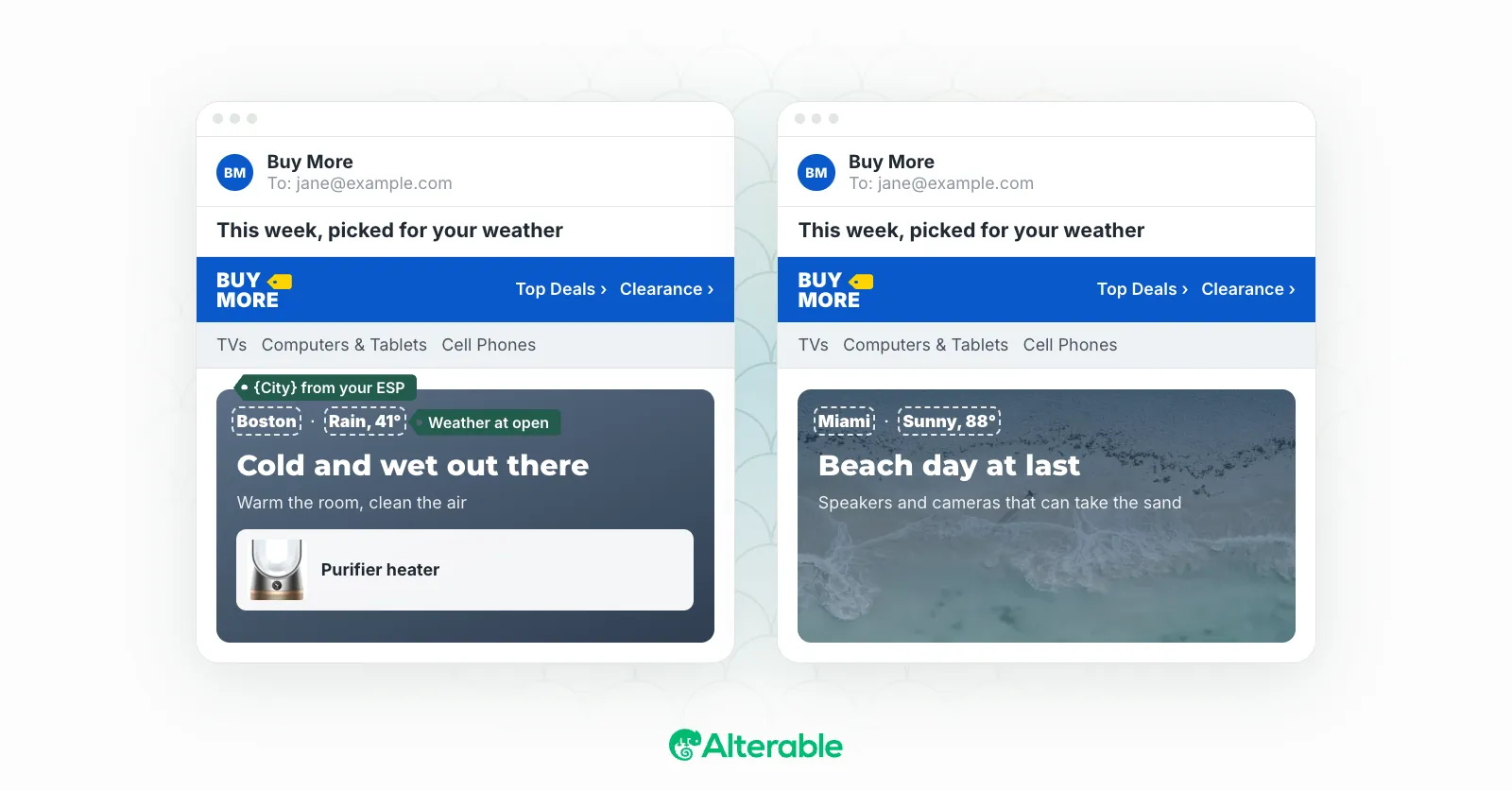
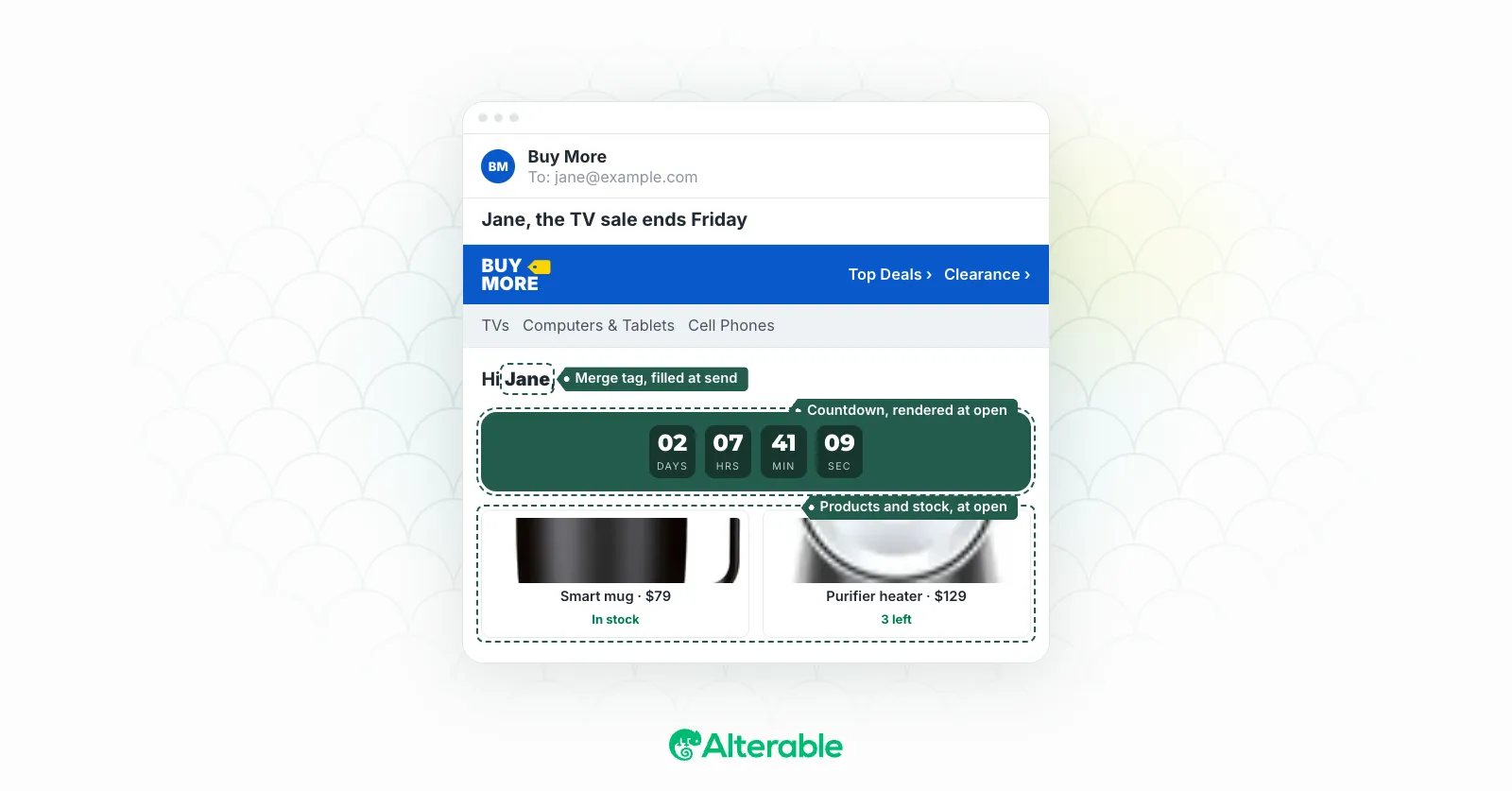
Send-time dynamic content is decided when your ESP builds the message. A merge tag drops in the first name. A conditional block shows the “VIP” section to loyalty members and hides it from everyone else. Product recommendations get pulled from last week’s browsing history. Once the email leaves the server, all of that is baked in. It’s personalized, but it’s static.
Open-time dynamic content is decided when the recipient opens the email. The countdown timer shows the time left right now. The map is centered on wherever the reader happens to be. The product card shows current stock and current price, not the stock and price from Tuesday. Open the same email again on Thursday from a different city, and you get a different email.
Nearly every ESP does the first kind. Almost none do the second. That’s not a criticism of ESPs, it’s a consequence of how email works, which brings us to the mechanics.
How dynamic content in email actually works
Email clients don’t run JavaScript. Gmail, Outlook, Apple Mail, none of them. You can’t ship a script that fetches fresh data when someone opens a message. The HTML you send is, for all practical purposes, a document, not an application.
So how does anything change at open time? Through the one thing email clients do fetch when a message opens: images.
Every image in an email is a URL, and the client requests that URL when it renders the message. If the server behind that URL generates the image on the fly, it can draw whatever is true at that moment. A timer that has the correct minutes left. A map of the right neighborhood, inferred from the request. A product tile with today’s price. The email client has no idea the image is special. It asked for a picture and it got one.
This is the mechanism behind countdown timers, dynamic images, local maps, and live product cards. One URL, rendered fresh on every request. If you want the nuts and bolts, I wrote up how dynamic image URLs work separately.
Here’s one in the wild. Elysium Health sent this through Klaviyo with a NiftyImages timer at the top, and because the timer is an image rendered on request, it’s still counting in the archived copy below. Open it tomorrow and it will say something different.
Elysium Health: Final hours for Creatine+ savings, captured by Inbox Archive
Send-time content, by contrast, lives inside your ESP. Klaviyo, Mailchimp, HubSpot and the rest all have some version of merge tags and conditional blocks. You write the rules, the ESP evaluates them per recipient at send, and the output is a plain HTML email. No special rendering involved. Which is why it’s universal, and why it can’t react to anything that happens after you hit send.
The caveats nobody puts in the brochure
Open-time content works because of image requests, so anything that interferes with image requests interferes with it. Two things do.
Gmail routes images through its own proxy and caches them, so a timer that’s been fetched once may be served from cache for a while. In practice this is less of a problem than it sounds, because the cache respects headers that tell it not to hold on to the image, but it’s a thing you need your rendering service to handle rather than something you get for free.
Apple’s Mail Privacy Protection pre-fetches images when mail arrives, sometimes long before a human opens anything. The image is then served from Apple’s proxy. For a countdown timer, that means the state it shows can reflect the pre-fetch rather than the actual open. Anyone who tells you open-time content is perfectly accurate on every client is either not sending to iPhones or not being straight with you. It’s accurate on most opens, and on the rest it degrades to roughly what send-time content would have shown anyway.
Neither of these is a reason not to do it. They’re reasons to pick a rendering service that has thought about them, and to always design a sensible fallback.
What you can actually make dynamic, by data source
It helps to think about dynamic email content by where the data comes from, because that determines which mechanism you need.
Data you already hold about the subscriber. First name, loyalty tier, points balance, signup date, last purchase. This is send-time territory, and your ESP handles it. The trap here is accuracy: a name field with “FRIEND” or a test value in it will get rendered faithfully. I’ve seen a campaign go out to a few thousand people with “Hi {{first_name}}” in the subject line because one segment was missing the field and nobody checked the fallback. Set the fallback. Then test the fallback.
Even big senders get caught. American Eagle’s RealRewards campaign below went out with “Friend” in the subject line, which is exactly what a first-name fallback looks like when it fires for a big chunk of the list. It’s not a disaster. It’s just a reminder that send-time personalization is only as good as the data behind it.
American Eagle: Friend, your mystery deal awaits, captured by Inbox Archive
Data about what they did. Browsed a category, abandoned a cart, clicked a link last week. Also send-time in most setups, and where the bulk of e-commerce personalization happens. Abandoned-cart emails with dynamic images are the classic case.
Data about the moment of opening. Time remaining, location, weather, current stock, current price. This is open-time only. There’s no way to know at send what time someone will open, so anything that depends on it has to render live. Countdown timers are the obvious example, and the most common first step into dynamic content for a lot of teams, which is why we have setup guides for the major ESPs.
If you want ten concrete campaigns built from these ingredients, I’ve collected real examples of dynamic content in email, from birthday flows to year-in-review emails.
When dynamic email content is worth the effort (and when it isn’t)
Here’s the part I’d want someone to tell me before I started.
Dynamic content pays off when the static alternative would be noticeably wrong for a meaningful share of readers. A flash sale that lasts three days and gets opened across all three: yes, a live timer earns its place. A webinar reminder where half your list is in another time zone: yes. A retailer with twelve locations sending a “visit us” email: a map of the nearest one beats a list of twelve addresses every time.
It pays off less when the content wouldn’t have changed anyway. A welcome email doesn’t need a countdown. A monthly newsletter to a list that opens within the first few hours doesn’t gain much from open-time rendering. And personalization that’s almost right can be worse than none. Greeting someone by a misspelled name or recommending a product they returned last week doesn’t read as attentive. It reads as automated, which is the thing you were trying to avoid.
McKinsey’s research found that 71% of consumers expect personalized interactions and 76% get frustrated when they don’t get them. I believe those numbers. But the same report’s title has the phrase “right or wrong” in it for a reason. The expectation cuts both ways.
So my honest rule of thumb: start with one element, in one campaign, where being accurate at open time clearly matters. Measure it against the static version. Personalized and static emails are easy to compare if you hold everything else constant. Then expand from there.
Adding it without changing your ESP
The practical worry I hear most often is that dynamic content means a platform migration. It doesn’t. Send-time personalization is already in your ESP. Open-time content is an image URL, and every email builder on earth can insert an image.
That’s the model we built Alterable around: you create the element (a timer, a personalized image, a map, a product card), copy the snippet, paste it into Klaviyo or Mailchimp or wherever you already send from, and it renders live in the inbox. The Mailchimp countdown timer guide takes about five minutes start to finish, and the Klaviyo one is the same.
Two things to check before your first send. Make sure the email still has enough actual text relative to images, because image-heavy layouts are a spam signal regardless of how clever the images are (the free spam checker will flag it). And send yourself a test, wait an hour, and open it again. If the timer moved, you’re done.
Static email isn’t going anywhere. Most of the messages in my inbox are static, and most of them are fine. But the ones that know what time it is, where I am, and whether the thing they’re selling is still in stock are the ones I remember. If you want to see what that looks like in your own campaigns, Alterable is free to start, and the first timer takes less time than reading this post did.