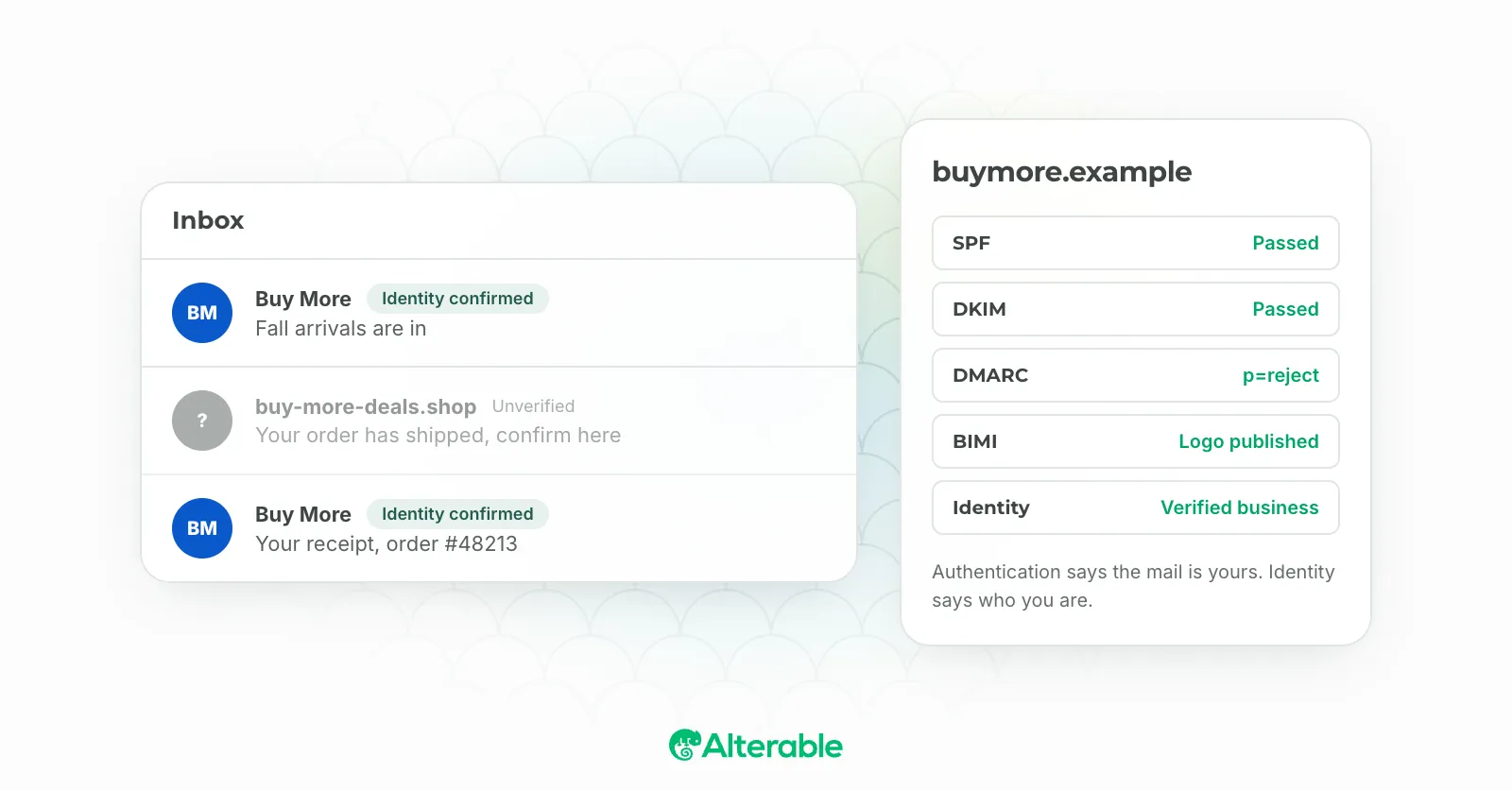
Open Gmail on your phone and look at the left edge of the inbox. Some senders have a logo there. Some have a coloured circle with an initial. A few have the logo and a small checkmark beside the name. Nobody paid Google for that. They earned it through a standard called BIMI, and the ones with the checkmark went a step further.
When I first wrote about BIMI email in 2023, my honest advice for most senders was to skip it and use a workaround, because BIMI needed a registered trademark and a certificate that cost real money. That advice is out of date. Since September 2024, Gmail accepts a cheaper certificate that doesn’t need a trademark, and the workaround I used to recommend still exists but does a lot less. Here’s where things stand, what you actually have to publish, and which route fits which sender.
What BIMI is, in one paragraph
BIMI stands for Brand Indicators for Message Identification. It’s a DNS record that points at your logo, and a rule that mailbox providers only show that logo next to messages that pass DMARC at enforcement. That second half is the point. The logo is the reward for having your authentication in order, so a phisher spoofing your domain can’t get it. The BIMI Group maintains the standard, and Gmail, Apple Mail, Yahoo, Fastmail and Zoho are among the providers that display it. Microsoft’s Outlook isn’t on that list.
What Gmail requires
Google’s setup page is specific, and its requirements are the strictest of the group, so if you meet them you meet everyone’s:
- DMARC at enforcement. The policy must be
p=quarantineorp=reject, andpctmust be 100. Ap=nonemonitoring policy shows nothing. This is the requirement that stops most senders, and it’s also the one that does them the most good. - A square SVG logo in the SVG Tiny PS profile, at least 96 pixels each way, with no scripts, no external resources and no embedded bitmaps, served with a
Content-Typeofimage/svg+xml. - A certificate from an approved issuer, in PEM format, proving you have the right to the logo. This is where the two options come in.
Then a DNS TXT record at default._bimi.yourdomain.com:
v=BIMI1; l=https://www.yourdomain.com/brand/logo.svg; a=https://www.yourdomain.com/brand/bimi.pemThe l= tag is the logo, the a= tag is the certificate. Google says the logo can take up to 48 hours to appear once the record is live.
VMC or CMC: the choice that changed in 2024
Until 2024 there was one kind of certificate, the Verified Mark Certificate, and it required a registered trademark on the logo. For a lot of small and mid-sized senders that was the end of the conversation. They had a logo. They didn’t have a trademark, and weren’t going to spend a year getting one to put an icon in Gmail.
In September 2024 the BIMI Group introduced the Common Mark Certificate, and Gmail started accepting it the same month. A CMC doesn’t need a trademark. It needs evidence the logo has been in public use for at least twelve months, which most established brands can show. The trade-off is visible in the inbox:
| VMC | CMC | |
|---|---|---|
| Requires | Registered trademark on the logo | 12 months of prior public use |
| Logo shown in Gmail | Yes | Yes |
| Blue checkmark in Gmail | Yes | No |
| Accepted by | Gmail, Apple Mail, others | Gmail only, for now |
Both come from the Mark Verifying Authorities the BIMI Group lists, both carry an annual fee that varies by issuer, and both are valid for at most 398 days before renewal. If you have the trademark, get the VMC: the checkmark is the thing people notice, and Apple Mail requires it. If you don’t, the CMC gets your logo into Gmail today rather than after a trademark application.
Yahoo is the exception to all of this. It will show a logo from a BIMI record with no certificate at all, provided the sending domain has enough reputation. That’s why some senders see their logo in Yahoo and nowhere else.
Setting it up, in order
- Get DMARC to enforcement first. If you’re at
p=none, that’s the project, and BIMI is what you get at the end of it. Our free DMARC record generator builds the record, and the email authentication guide covers getting SPF and DKIM aligned so you can tighten the policy without losing mail. - Produce the SVG. Your designer exports a square SVG; someone then has to convert it to the Tiny PS profile, which strips what the standard forbids. The BIMI Group’s implementation guide covers the conversion and has a validator.
- Buy the certificate. VMC if you hold the trademark, CMC if you can show a year of use. Expect to prove your identity to the issuer; it’s closer to buying an EV certificate than a domain one.
- Host the SVG and the PEM on your own domain over HTTPS, then publish the TXT record at
default._bimi. - Wait, then check. Send to a Gmail address you control and look at the inbox on mobile, where the logo is most prominent. Give it the 48 hours before you conclude something’s wrong.
The Gmail profile-picture shortcut
There’s an older trick, and the previous version of this post led with it: create a Google account for your sending address, set your logo as its profile photo, and Gmail shows that photo as the avatar next to your emails. It still works, and for a sender on a small budget it’s a reasonable first step.
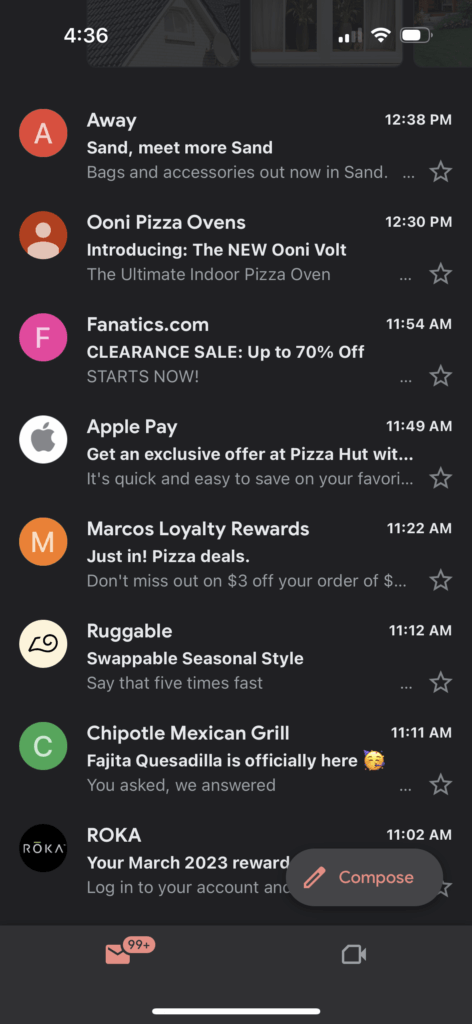
Know what it is, though. It’s an avatar attached to one Google account, tied to that exact address. It shows in Gmail and nowhere else. It carries no authentication signal, so it does nothing to stop a spoofer, and it can’t earn the checkmark. BIMI is the mechanism Google built for this, and now that a CMC removes the trademark barrier, the shortcut is mainly for senders who aren’t yet at DMARC enforcement and want something in the inbox while they get there.
Is BIMI email worth the effort?
I’ll be honest about the deliverability claim, because the 2023 version of this post wasn’t. BIMI doesn’t get your mail into the inbox. It doesn’t influence filtering. What it does is show a logo to people whose mail already arrived, and that logo is worth something: recognition in a crowded list, and a visual cue that this is the real sender.
The real value is upstream. To get BIMI you have to reach DMARC enforcement, and reaching enforcement is what protects your domain from spoofing and what Gmail and Yahoo have been pushing bulk senders toward since 2024. The logo is the prize that gets the DMARC project funded. I’ve watched it work that way in more than one company: nobody would approve a quarter of authentication work for its own sake, and everyone approved it once the brief said “our logo in Gmail”.
If you’re already at enforcement, BIMI is an afternoon and a certificate fee. If you aren’t, start there, and treat the logo as the finish line rather than the goal.