I remember the first time I saw a countdown timer in an email that was actually counting down in real time. The sale ended in less than an hour, the clock was ticking, and I clicked through faster than I’d like to admit. That email had done something most emails don’t: it reacted to when I opened it, not just who I was.
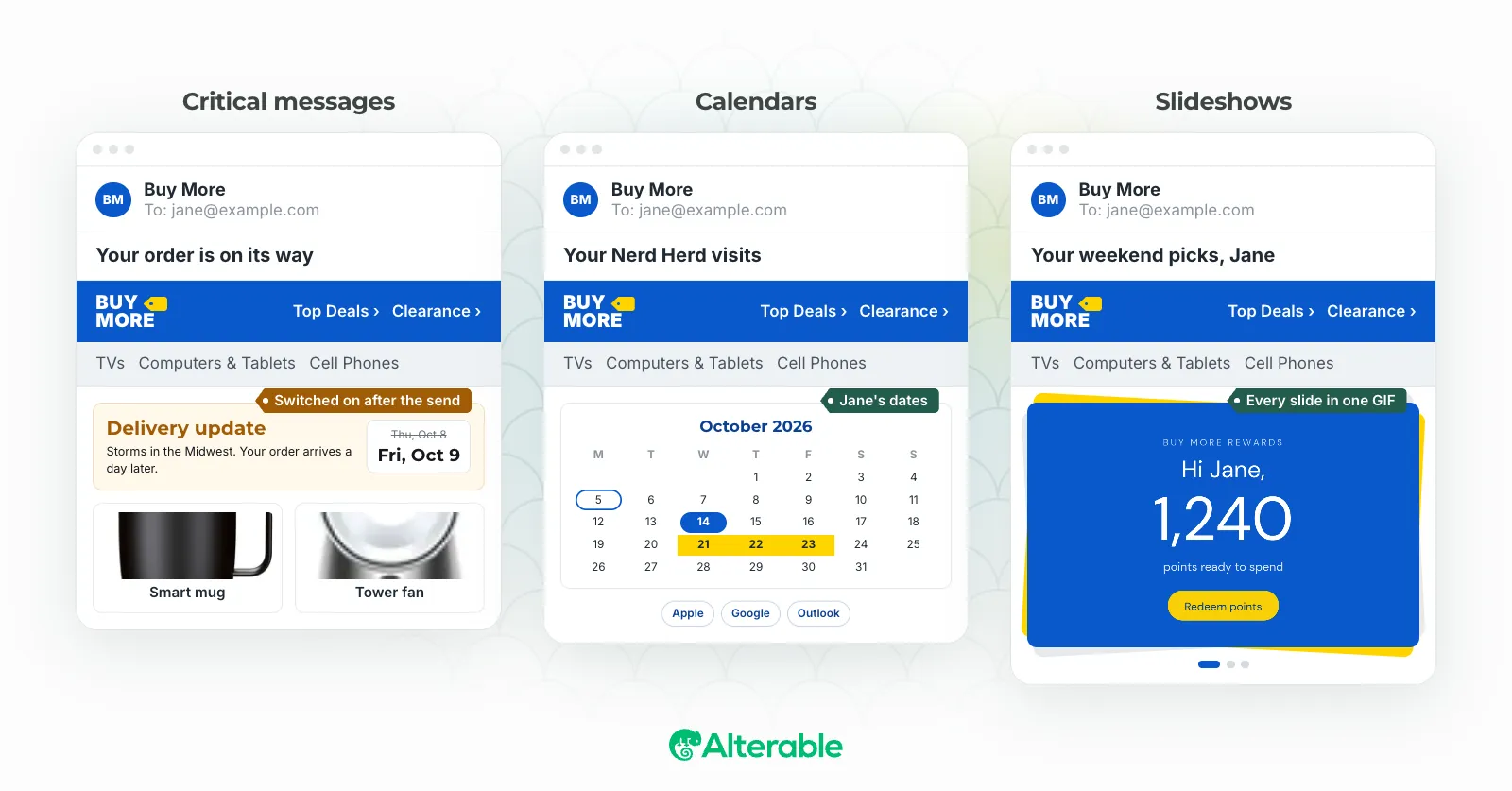
That’s the promise of dynamic images in email. The image renders when the subscriber opens the message (not when you hit send) which means it can reflect reality as it is right now: their name, their city, the time remaining on an offer, the product they almost bought. Used well, it’s one of the most powerful tools in email marketing.
But I’ve also seen dynamic images backfire. A personalized banner that greets someone with “Hi [FIRST_NAME]” because a name field was blank. A countdown timer frozen at zero long after the sale ended. A product image that took so long to load the subscriber had already scrolled past it. The technology is only as good as the thinking behind it.
Here’s what separates the campaigns that work from the ones that don’t.
What Are Dynamic Images in Email?
Dynamic images are email images that change based on data about the recipient. Instead of embedding a fixed image in your HTML, you embed a URL that generates or serves a different image depending on variables: the subscriber’s name, location, past purchases, the time they open the email, or any other data point in your system.
When someone opens your email, the image loads in real time, pulling the most current data and serving something tailored to that specific person. The result is an email that feels less like a broadcast and more like a message meant for them.
1. Personalize Based on Data You Actually Have
The most common mistake I see with dynamic images is over-personalizing, reaching for fields you don’t actually have reliable data for. Location, gender, purchase history: these all sound great in a briefing doc, but if your data is incomplete, your dynamic image will show the wrong thing or fall back to a generic placeholder that looks broken.
Start with what you’re confident in. First name, recent purchase, subscription tier, and email open time zone are typically the most reliable starting points. Build your dynamic image strategy around those fields first, then expand as your data improves.
A personalized banner with the subscriber’s first name will almost always outperform a generic hero image. But only if your name field is clean and complete. Bad personalization is worse than no personalization at all. I’ve seen a campaign go out with “Hi there,” as the fallback because the team hadn’t accounted for empty name fields. The numbers were rough.
2. Match the Image to the Subscriber’s Stage in the Journey
A subscriber who just signed up and one who’s been a paying customer for two years shouldn’t see the same image. Dynamic images let you reflect the actual relationship you have with each person. Some examples of how this plays out:
- New subscribers: A welcome image or a product overview visual
- Active customers: New arrivals or an upsell related to their last purchase
- Lapsed customers: A win-back offer or a “we miss you” visual
- VIP customers: Exclusive access or loyalty rewards imagery
This approach requires segmenting your list and mapping each image variant to a segment, which takes more setup. But the payoff in relevance (and in click-through rates!) is measurable. Relevance beats volume every time.
3. Use Real-Time Dynamic Images to Keep Content Current
One of the most underused advantages of dynamic images in email is that they render at open time, not send time. That means your content can reflect what’s true right now, not what was true when you set up the campaign.
Practical applications:
- Countdown timers: The exact time remaining until a sale ends, updated every time the email is opened
- Live inventory: “Only 3 left” or “Sold out,” based on current stock levels
- Weather-triggered images: A product image matched to the subscriber’s local weather at the moment they open
- Current pricing: Price changes reflected automatically, without resending the campaign
Real-time rendering turns email into a live channel. How many emails in your inbox right now show you accurate, up-to-the-minute information? Probably not many, which is exactly why the ones that do stand out.
4. Always Design a Fallback Image
Not every dynamic image will render correctly for every subscriber. Some email clients block images by default. Some subscribers are on slow connections. Some data fields are empty. Dynamic image generation can occasionally time out.
You need a fallback image for every dynamic variant in your campaign. It should be on-brand, safe to show to anyone, and still make sense in context. If your dynamic image is supposed to show a personalized product recommendation, the fallback shouldn’t be a blank space, it should show a relevant product category, or something that holds up on its own.
Build your fallback strategy before you build your dynamic variants. It’s not an afterthought. It’s part of the design.
5. Optimize for All Major Email Clients
Dynamic images are typically served as animated GIFs or as standard image files generated on the fly. Both formats come with compatibility considerations worth planning for.
A few things to check:
- Outlook (2007–2019): These versions don’t animate GIFs, they show only the first frame. Make sure your first frame communicates the message on its own.
- Gmail: Generally supports dynamic images well, but image caching can occasionally cause stale renders. Cache-busting parameters in your image URLs help.
- Apple Mail: Supports most dynamic content natively, including animated GIFs and live images.
- Dark mode: Your dynamic images need to hold up in both light and dark environments. Test both before you send.
Always test across the email clients your audience actually uses. Don’t guess.
6. Keep File Sizes Small
A dynamic image that takes too long to load defeats the entire purpose. If it’s still rendering while the subscriber has already scrolled past it, the personalization was wasted.
Aim to keep image file sizes under 100KB where you can. For animated content, keep the loop as short as possible while still getting the point across. Tools like ImageOptim (or the compression features built into most dynamic image platforms) can help without sacrificing quality.
Load time matters more in email than it does on the web. Subscribers make quick decisions about whether to keep reading, and a slow-loading dynamic image can hurt performance more than a fast-loading static one would have.
7. A/B Test Your Dynamic Image Variants
Dynamic images give you more variables to test. That’s a feature, not a problem. Some high-value tests to run:
- Personalized image (with subscriber name or product) vs. generic image
- Countdown timer vs. static sale banner
- Location-specific image vs. one-size-fits-all
- Product-based recommendation vs. category-based recommendation
Change one variable at a time, and let each test run long enough to reach statistical significance before drawing conclusions. Over time, the data builds into a clearer picture of what your audience responds to, and that’s worth more than any single campaign result.
8. Don’t Sacrifice Accessibility
Dynamic images need alt text just like static images do. When the image is personalized, the alt text should reflect that personalization where possible.
If your dynamic image says “Hi Sarah, here’s your recommendation,” the alt text shouldn’t just say “product image.” It should say something like “Personalized product recommendation for Sarah.” When images are blocked (or when a subscriber uses a screen reader) the alt text carries the full weight of that message.
Accessibility isn’t optional. It’s table stakes for any well-run email program.
Common Mistakes to Avoid
Even with the best setup, dynamic images can go wrong. A few patterns I’ve seen cause the most problems:
Using dynamic images for their own sake. Personalization should serve the subscriber’s experience. If the dynamic element doesn’t make the email more relevant or useful, you’re adding complexity without adding value.
Ignoring load times. Complex dynamic image logic can translate directly to slower render times. Simplicity usually wins.
Not testing with real data. Always preview your dynamic images with actual subscriber data. Edge cases (long names, empty fields, unusual characters) can break your layout in ways a mock preview won’t catch.
Forgetting expiry rules. Countdown timers and inventory displays need a defined end state. If a subscriber opens your email two days after the sale ended, the timer should show something that still makes sense, not a frozen “00:00:00” or a broken image.
Dynamic images in email work best when they’re built on clean data, designed with fallbacks in mind, optimized for all clients, and tested rigorously. The best practices here exist because dynamic images introduce variables that static images don’t have. Managing those variables well is what separates campaigns that lift engagement from ones that create new problems.
Start with one or two of these, see how they perform, then layer in more. The investment compounds.