Personalization in email used to mean putting someone’s first name in the subject line. Marketers called it personal. Subscribers tolerated it. Today, it means showing every subscriber a version of your email that feels like it was made specifically for them, images included.
How many emails in your inbox right now actually achieve that? Probably fewer than you’d expect. Dynamic images are the engine behind visual personalization in email, and this guide explains what they are, how they work in practice, and how to use them to build campaigns that feel genuinely personal at scale.
What Are Dynamic Images?
Dynamic images are email images that adapt based on data about the recipient. The image URL in your email HTML doesn’t point to a fixed file. Instead, it points to a service that generates or selects the right image at the moment the email is opened, based on subscriber data embedded in the URL.
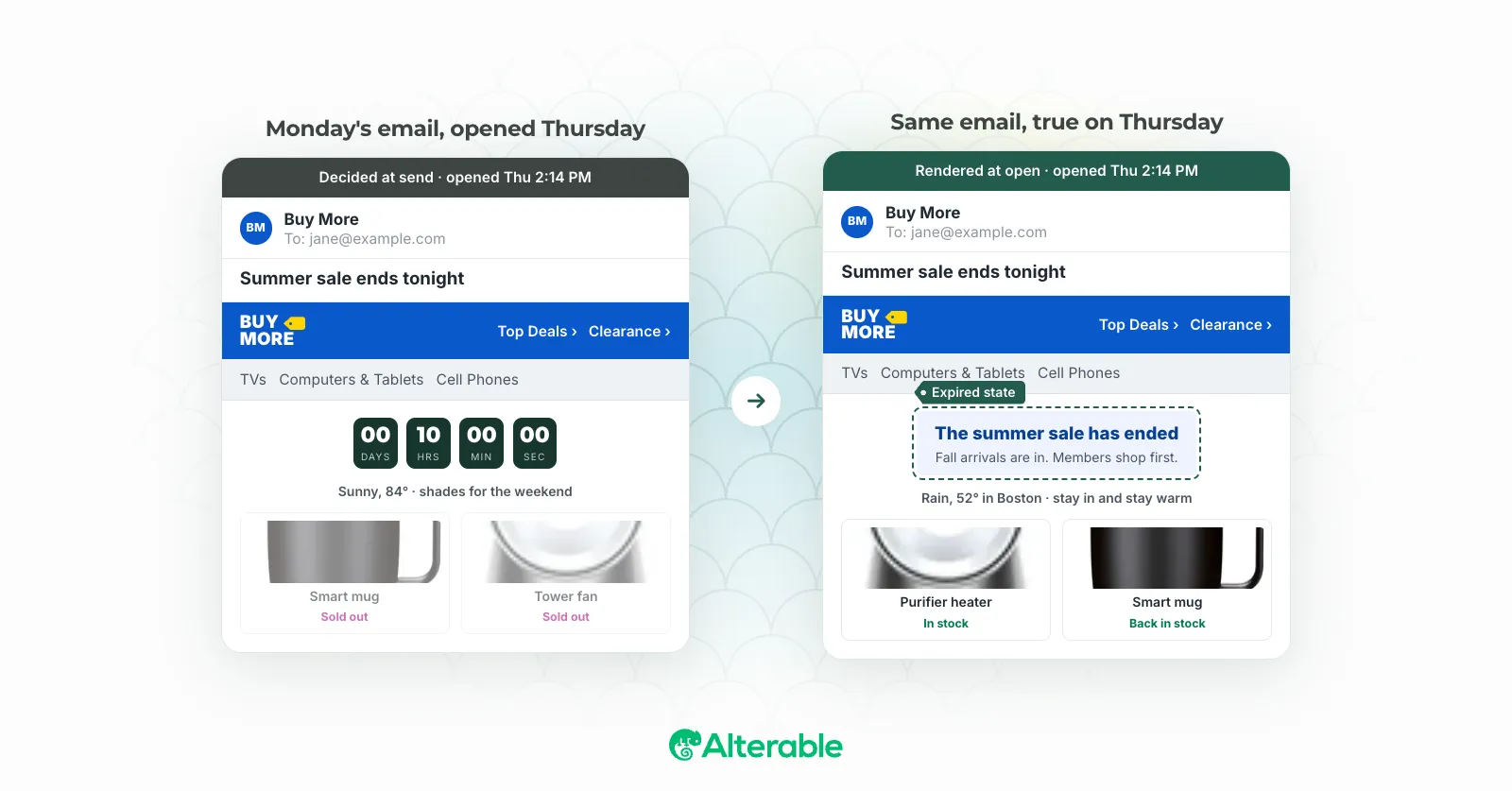
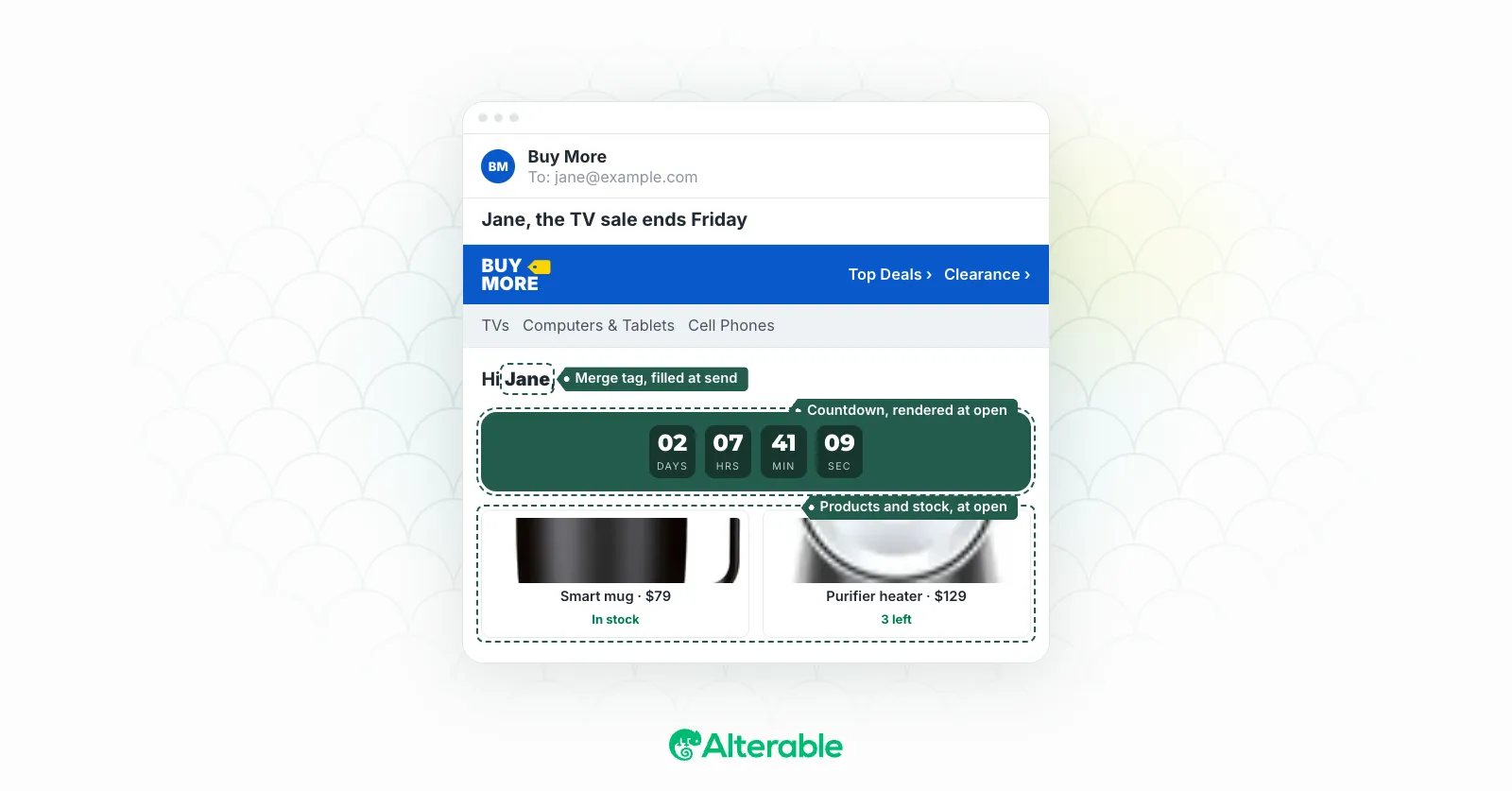
The result: two subscribers receive the same email but see completely different images. One sees their name on a personalized banner. The other sees product recommendations based on what they last browsed. Both see a countdown timer showing the exact time remaining (as of the moment they opened the email, not when it was sent).
The email was sent once. The personalization happens in real time.
Why Visual Personalization Works
Text personalization (a name in a subject line or body copy) has diminishing returns. Subscribers have seen it so often that it no longer signals genuine relevance. A personalized image is different. It’s harder to produce, rarer in the inbox, and registers as real attention.
In my experience, personalized visual content tends to outperform generic images across click-through rate, conversion rate, and revenue per email. [Add source link here, this claim needs attribution.] The effect is strongest when the personalization is genuinely relevant: a product you actually looked at, an offer tied to your loyalty tier, an image that reflects your location or the weather where you live.
I’ve seen this play out in ways that are hard to argue with. When the image is relevant, the rest of the email becomes more credible. Subscribers who see something that’s clearly meant for them are more likely to read further, click, and convert. The image earns the trust before they’ve read a single line of copy.
Types of Dynamic Image Personalization
There are several distinct types of dynamic image personalization, each suited to different campaign goals. Which one makes sense for you depends on your data, your audience, and what you’re trying to accomplish.
Name Personalization
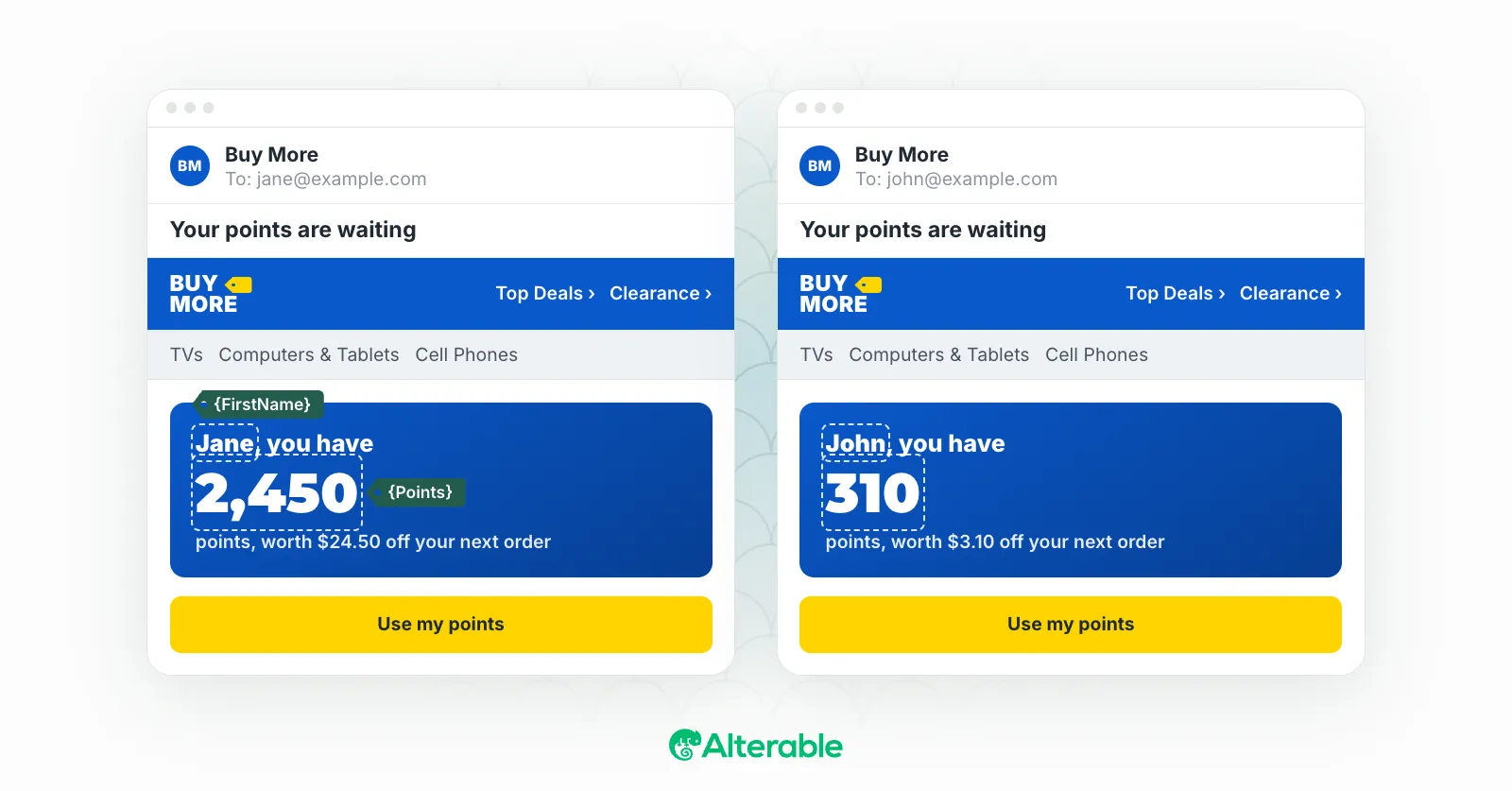
The simplest form: overlay the subscriber’s name onto a banner, gift card, certificate, or product image. This works well for welcome emails, loyalty programs, birthday campaigns, and any email where you want the subscriber to feel recognized.
Product-Based Personalization
Show an image of a specific product: the one the subscriber browsed, bought, or abandoned in their cart. The image can be the product photo itself, a lifestyle shot featuring that product, or a branded recommendation card.
Location-Based Personalization
Serve an image that reflects the subscriber’s city, region, or country. This can mean showing a relevant store location, weather-appropriate products, or region-specific offers. A subscriber in Miami and a subscriber in Minneapolis should probably see different winter campaign images.
Behavioral Personalization
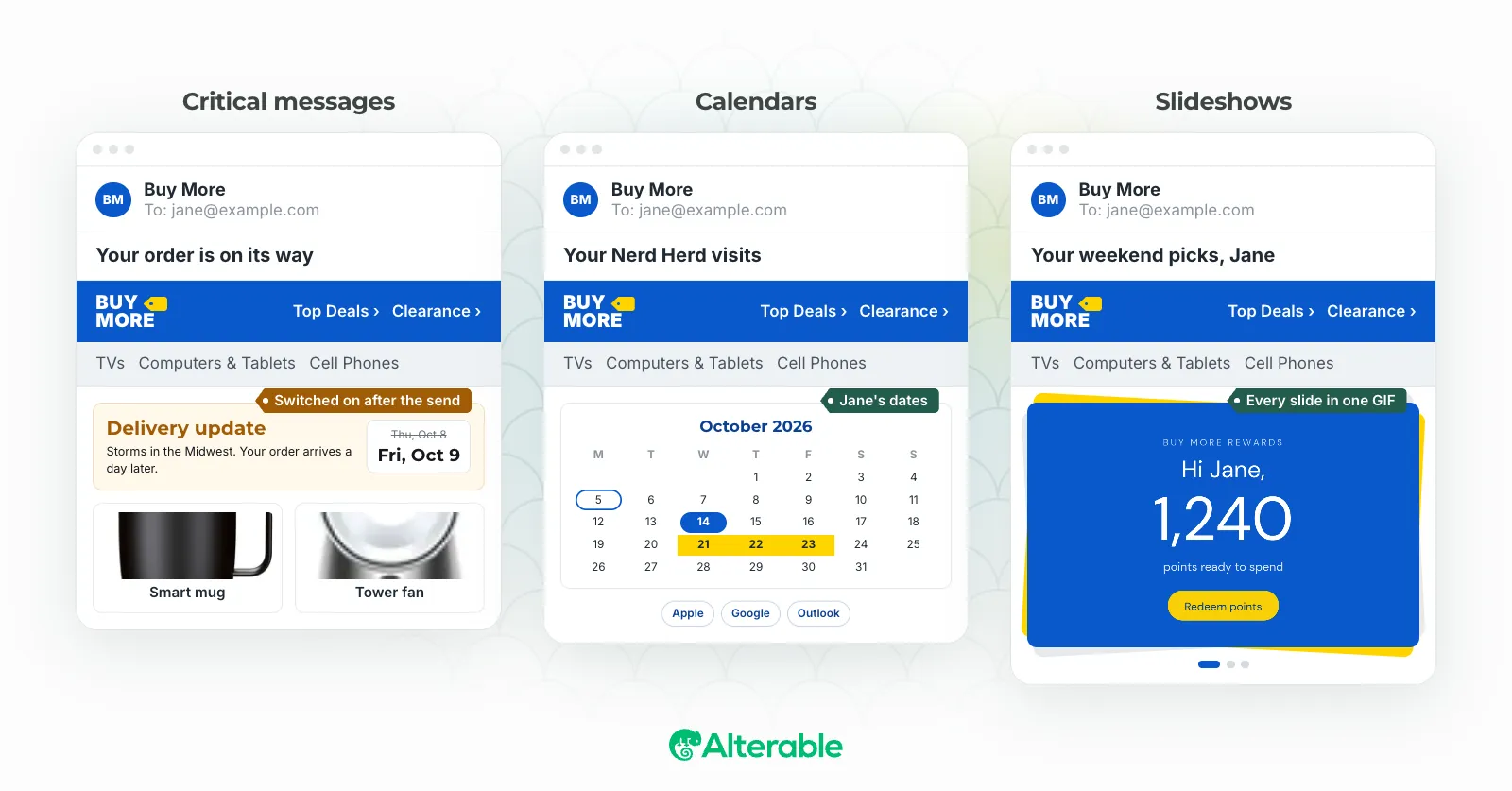
Adapt the image based on what the subscriber has done, or not done. First-time buyers see a different image than repeat customers. Subscribers who haven’t opened in 90 days see a win-back visual. Loyalty program members see their tier badge and points balance.
Real-Time Personalization
Show information that’s accurate at the moment of open, not the moment of send. This includes countdown timers, live inventory counts (“only 2 left”), current pricing, and weather-triggered product images. Real-time personalization is uniquely powerful because it makes your email feel alive rather than static.
How to Implement Dynamic Images in Your Campaigns
Step 1: Identify Your Personalization Data
Start with the data you have and trust. Common starting points are first name, recent purchase or browse history, loyalty tier, and location. Don’t try to personalize on data you’re not confident in. Bad personalization breaks trust faster than no personalization.
Step 2: Choose a Dynamic Image Tool
You’ll need a service that can generate personalized images from a URL with parameters. Alterable lets you build image templates and serve personalized versions through a simple URL structure. You define the design; the platform handles the rendering and delivery.
Step 3: Build Your Image Templates
Create the base design for your dynamic image: the layout, fonts, colors, and fixed elements. Then define which parts will change based on data: the name field, the product image area, the offer text. Your dynamic image service will use the template and the URL parameters to generate each personalized version.
Step 4: Integrate With Your ESP
In your email HTML, replace the static image URL with your dynamic image URL, using your ESP’s merge tags to inject subscriber data into the URL parameters. Most major ESPs support this. You’re using the same merge tag syntax you already use for text personalization, just applied to an image URL instead.
For example:
<img src="https://img.alterable.com/banner?name={{first_name}}&product={{last_product_id}}" alt="Personalized recommendation for {{first_name}}">
Step 5: Define Fallbacks
For every dynamic image, define what should appear if the subscriber’s data is incomplete or the image fails to generate. The fallback should be a relevant, on-brand image that makes sense in context.
Step 6: Test Thoroughly
Test your dynamic images with real subscriber data before sending. Check edge cases: very long names, missing fields, subscribers in unexpected locations. Test in the email clients your audience uses. Verify that fallbacks work correctly when data is absent.
Segmentation and Dynamic Images: Better Together
Dynamic images reduce the need for separate campaign versions, but they work best when combined with smart segmentation. Rather than one email with many dynamic variables (which can become difficult to manage and test), consider using segmentation to define broad groups and dynamic images to personalize within those groups.
For example: segment your list into active customers and lapsed customers, then use dynamic images within each segment to show relevant products. This gives you the efficiency of dynamic personalization without the complexity of trying to serve every possible subscriber state from a single email.
Measuring the Impact of Dynamic Images
To understand whether your dynamic images are working, you need to measure them properly. The most useful metrics are:
- Click-through rate by segment: Compare CTR for subscribers who received a personalized image versus those who received a fallback.
- Revenue per email: Personalized product images in particular should move this number.
- A/B test results: Run systematic tests (personalized vs. generic image, one personalization type vs. another) to build a clear picture of what works for your audience.
Don’t just measure whether your email performed well overall. Measure whether the dynamic image specifically improved performance compared to a static alternative. That’s the signal that tells you whether to invest further in visual personalization.
What to Avoid in Dynamic Images
- Personalizing for its own sake: If the personalization doesn’t make the email more relevant or useful, it’s decoration.
- Ignoring fallbacks: A broken or irrelevant fallback image does more damage than a good static image would have.
- Over-engineering your first campaign: Start simple. One dynamic element, tested and measured, teaches you more than five untested ones.
- Not cleaning your data: The quality of your personalization is limited by the quality of your data. A name field full of “null” or “undefined” will produce embarrassing results.
Start Small, Then Build
Dynamic images close the gap between “sent to everyone” and “made for you.” When you match the visual experience to what you know about each subscriber (their behavior, their location, their relationship with your brand), you create emails that feel different from everything else in the inbox.
That difference is measurable: higher click-through rates, more revenue per email, stronger loyalty metrics. Getting there requires discipline: clean data, solid fallbacks, systematic testing, and a clear sense of which personalization actually serves your subscribers.
Start with one element. Measure it carefully. If you want a tool built for exactly this kind of work, Alterable is worth exploring.